
Showing posts with label Operating System. Show all posts
Showing posts with label Operating System. Show all posts
Saturday, December 22, 2018

Monday, November 19, 2018
Disk Scheduling Algorithms
Disk Scheduling:
- The operating system is responsible for using hardware efficiently, for the disk drives, this means having a fast access time and disk bandwidth.
- Access time has three major components: -
Ø Seek time: it is the average time taken by the head to move from one track to another.
Ø Rotational latency: it is the additional time waiting for the disk to rotate the desired sector to the disk head. It is not fixed so we take the average value.
Ø Transfer time: it is time taken to transfer the data
Disk Access Time = Rotational Latency + Seek Time + Transfer Time
Disk Response Time= Delay Time (spent for IO operation) + Disk Access Time
Purpose of Disk Scheduling:
The main purpose of the disk scheduling algorithm is to select a disk request from the queue of IO requests and decide the schedule when this request will be processed.
The goal of Disk Scheduling:
Ø Fairness
Ø High throughout
Ø Minimal traveling head time
Disk Scheduling Algorithms
1. FCFS:
FCFS is the simplest of all the Disk Scheduling Algorithms. In FCFS, the requests are addressed in the order they arrive in the disk queue.
2. SSTF:
In SSTF (Shortest Seek Time First), requests having shortest seek time are executed first. So, the seek time of every request is calculated in advance in queue and then they are scheduled according to their calculated seek time. As a result, the request near the disk arm will get executed first. SSTF is certainly an improvement over FCFS as it decreases the average response time and increases the throughput of system.
3. SCAN:
In SCAN algorithm the disk arm moves into a particular direction and services the requests coming in its path and after reaching the end of disk, it reverses its direction and again services the request arriving in its path. As a result, the requests at the midrange are serviced more and those arriving behind the disk arm will have to wait.
4. CSCAN:
In SCAN algorithm, the disk arm again scans the path that has been scanned, after reversing its direction. So, it may be possible that too many requests are waiting at the other end or there may be zero or few requests pending at the scanned area.
it is known as Circular SCAN.
5. LOOK:
It is similar to the SCAN disk scheduling algorithm except the difference that the disk arm in spite of going to the end of the disk goes only to the last request to be serviced in front of the head and then reverses its direction from there only. Thus it prevents the extra delay which occurred due to unnecessary traversal to the end of the disk.
6. CLOOK:
CLOOK is similar to CSCAN disk scheduling algorithm. In CLOOK, the disk arm inspite of going to the end goes only to the last request to be serviced in front of the head and then from there goes to the other end’s last request. Thus, it also prevents the extra delay which occurred due to unnecessary traversal to the end of the disk.
Example:
On a disk with 1000 cylinders, number 0 to 999, compute the number of tracks the disk arm must move to satisfy all the requests in the disk queue. Assume the last request serviced was at track 345 and the head is moving toward track 0. The queue in FIFO order contains requests for the following tracks,
123, 874, 692, 475, 105, 376.
Perform the computation for the above scheduling algorithms.
FCFS:

Total R/W head Movement: 222+751+182+217+370+271 =2013 tracks
SSTF:

Total R/W head Movement: 31+99+182+217+182+751+18=1298 tracks
SCAN:

Total R/W head Movement: 222+18+105+376+99+217+182=1219 tracks
LOOK:
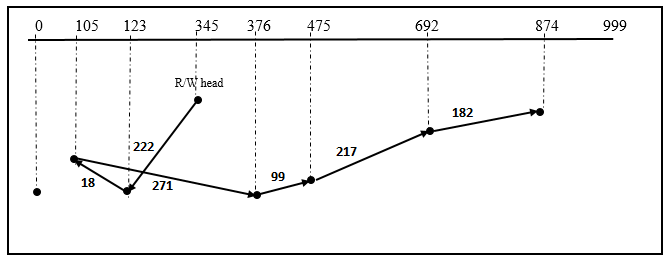
Total R/W head Movement: 222+18+271+99+217+182=1009 tracks
CSCAN:

Total R/W head Movement: 222+18+105+999+125+182+217+99= 1967 tracks
CLOOK:

Total R/W head Movement: 222+18+769+182+217+99= 1507 tracks
Saturday, November 17, 2018
Page Replacement Algorithms in Operating System
In a multiprogramming environment, the following scenario often results:


- While execution of a process, a page fault occurs and there are no free frames on the free frame list. This is called over allocation of memory and results due to increase in the degree of multi-programming.
- Page replacement is a technique to solve this problem.
Concept:
If no free frame is available, a frame is found which is not in use. The contents of the frame are written on to a backing store and the page tables are modified to indicate that the page is no longer in memory. Thus, the frame can be used to hold the page for which the page fault was generated.
One bit is associated with each frame. If the bit is 1, this implies that the contents of the page were modified. This is called the dirty bit. If the dirty bit is 0, the content of the frame need not be written to the backing store.
Page Replacement Algorithms:
FIFO (First in First Out):
- · Each page in the memory is associated with a time when it was brought into memory. The oldest page is chosen. A queue is maintained for the pages. When a page is brought into memory, it is inserted at the tail of the queue. A page is replaced at the head of queue.
- · The FIFO algorithm is simple to implement. The performance though is not very good. The algorithm suffers from Belady’s anomaly means that the page fault rate may increase as the number of frames allocated increases.
Optimal Page Replacement:
- The page which will not be used for a longer period of time is replaced.
- This algorithm gives a lowest page fault rate. It is very difficult to implement because it requires future knowledge about the usage of the page.
LRU (Least Recently Used):
- The page which has not been used for a longest period of time is replaced.
- LRU algorithm needs considerable hardware assistance for implementation of this strategy.
Example:
Given Reference string is 0, 1, 4, 2, 0, 2, 6, 5, 1, 2, 3, 2, 1, 2, 6, 2, 1, 3, 6, 2
How many page faults will occur, if the program has three page frames?
FIFO (First in First Out): Number of Frames= 3

Total number of page faults=13
Optimal Page Replacement: Number of Frames= 3

Total number of page faults=9
LRU (Least Recently Used):

Total number of page faults=14
Monday, November 12, 2018
How to install Fedora 18 Operating System?
Step by Step process:
Step1:-Insert Fedora 18 DVD
Step2:-Boot from DVD
Step3:-Select option- Install Fedora
Step4:-Select Language (English) then press continue
Step5:-click on Software selection
Step6:-Select GNOME Desktop
Step7:-Choose your add-ons-Select all software then press click on done button
Step8:-Storage-Go to Installation Destination then click on continue.
Step9:-check let me customize partition the disk instead of click on continue
Step10:-Click on ADD button---
Mount point -/boot
Desired capacity - 500MB
Click on Add
Step11:- Click on ADD button---
Mount point -/
Desired capacity - 100GB
Click on Add button
Step12:-Click on ADD button---
Mount point -swap Area
Desired capacity - 8GB (Double of RAM space)
Click on Add
Step13:-Select root partition then click on finish partitioning
Step14:-Set root password
Step15:-Click on begin installation button.....
Step1:-Insert Fedora 18 DVD
Step2:-Boot from DVD
Step3:-Select option- Install Fedora
Step4:-Select Language (English) then press continue
Step5:-click on Software selection
Step6:-Select GNOME Desktop
Step7:-Choose your add-ons-Select all software then press click on done button
Step8:-Storage-Go to Installation Destination then click on continue.
Step9:-check let me customize partition the disk instead of click on continue
Step10:-Click on ADD button---
Mount point -/boot
Desired capacity - 500MB
Click on Add
Step11:- Click on ADD button---
Mount point -/
Desired capacity - 100GB
Click on Add button
Step12:-Click on ADD button---
Mount point -swap Area
Desired capacity - 8GB (Double of RAM space)
Click on Add
Step13:-Select root partition then click on finish partitioning
Step14:-Set root password
Step15:-Click on begin installation button.....
Subscribe to:
Posts (Atom)